

Need help? Contact us:
Menu
CATEGORIES
- Cigarette lighter socket adapter
- Wireless Android Auto adapter
- Apple adapter
- Battery adapter
- Car Bluetooth adapter
- Wireless CarPlay adapter
- SD card adapter
- SIM card adapter
- DisplayPort to HDMI adapter
- DVI to HDMI adapter
- Ethernet adapter
- Wii HD adapter
- HDMI adapter
- USB-C to HDMI adapter
- HDMI to jack adapter
- HDMI to VGA adapter
- Wireless charging adapter
- iPhone adapter
- Audio jack adapter
- iPhone jack adapter
- Jack to Lightning adapter
- Jack to USB adapter
- Lightning to USB-C adapter
- Mac HDMI adapter
- MacBook Air adapter
- Micro SD adapter
- OTG adapter
- SCART to HDMI adapter
- EU to UK Adapter
- Canada plug adapter
- France to USA plug adapter
- Ireland plug adapter
- Swiss plug adapter
- USA plug adapter
- RCA to HDMI adapter
- Power adapter
- Adaptateur SSD USB
- Universal adapter
- Universal travel adapter
- USB adapter
- USB-A to HDMI adapter
- USB Bluetooth adapter
- USB-C adapter
- USB-C to jack adapter
- USB-C to USB-A adapter
- USB Ethernet adapter
- USB-C to DisplayPort adapter
- Adaptateur USB-C magnétique
- USB-C to VGA adapter
- 4K HDMI cable
- USB 3.0 hub
- USB-C hub
- USB SD card reader
- HDMI switch and splitter
- All adapters

Filter by rating
Filter by price

Free shipping in Europe
Make the most of it!
Shop
DVI to HDMI Adapter
A DVI to HDMI adapter links two sockets that carry exactly the same digital video signal: the picture goes through with no conversion and no loss. Sound, however, does not travel over DVI, and the shape of the DVI socket matters. Everything is explained below the selection.


DVI and HDMI, the same picture through two sockets
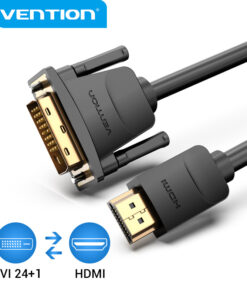
DVI-D and HDMI share the same video encoding. Going from one to the other therefore needs no electronic conversion, just a change of connector. A simple cable or an adapter plug is enough, and the picture loses nothing: it stays digital from end to end, with no degradation and no added latency.
The difference lies in what DVI does not carry. It has no audio channel, and it handles neither HDR nor the very high refresh rates of recent HDMI standards. To connect a desktop monitor or an older projector to a modern computer, that makes no difference at all.
Identify the right socket before ordering
Three DVI formats are in circulation, and they are not interchangeable both ways.
- DVI-D, purely digital, the most common on monitors and graphics cards. It is the one that talks directly to HDMI.
- DVI-I, which adds four analogue pins around the flat central blade. A DVI-D connector fits a DVI-I socket, not the other way round.
- DVI-A, analogue, rare, incompatible with HDMI without active conversion.
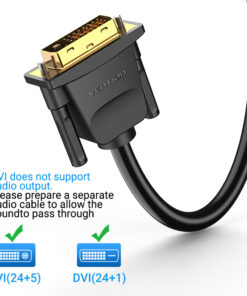
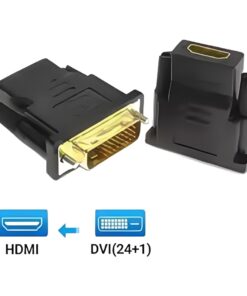
The label 24+1 refers to the pin layout of dual-link DVI-D. It is the format to look for in almost every case, as on our bidirectional DVI-D 24+1 to HDMI cable.
One-piece cable or adapter plug
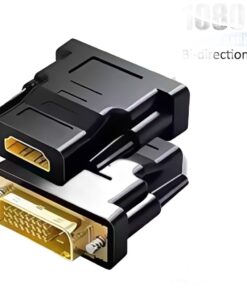
A short adapter plug converts the socket and takes an existing cable. It costs less and avoids rerouting a cable already run behind furniture, like our DVI male to HDMI female adapter. On the other hand, it adds two contact points and puts the weight of the cable on the graphics card port.
A one-piece cable removes those joints. It is the most reliable solution for a fixed workstation, and the one we recommend whenever the link should be forgotten once plugged in.
What explains a missing picture
In this order, and it settles almost every case.
- The direction of the link, when an active converter is used. A model designed to go from HDMI to DVI does not work the other way.
- The source selected on the monitor, which often stays on the previous input.
- The cable itself, to be tested on another device before any other hypothesis.
- A resolution forced in the display settings, which may exceed what the monitor accepts.
No sound comes through, and that is normal
The DVI standard has no audio channel. If your monitor has speakers, you will need a separate audio link, through the computer's headphone output or a dedicated cable. It is not a fault of the adapter, it is a feature of the standard, and no cable can change it.
Narrow your search
Your source outputs HDMI and the monitor only has a DVI socket? The same bidirectional adapters work in that direction too, for example our HDMI to DVI adapter with locking screws, or the 50 cm HDMI to DVI 24+1 lead that keeps a heavy cable from levering on the monitor socket.
Frequently asked questions
Is there any loss of picture quality?
No. The signal stays digital from start to finish. A blurry picture comes from the cable, the resolution setting or the monitor, never from the DVI to HDMI step.
Can I connect a DVI monitor to a games console?
Yes for the picture, using an HDMI to DVI link. Sound will have to be taken another way, as consoles usually have no separate audio output.
Do I need a powered adapter?
Not for a DVI-D to HDMI link, which is passive. Power only becomes necessary to convert to an analogue standard such as VGA.
What is the maximum cable length?
Up to five metres, an ordinary quality cable is enough. Beyond that, the quality of the shielding becomes decisive, and a link that is too long shows up as flickering or a complete loss of signal.